
ML and AI Blogs | Issue# 18 [May 18, 2026]
Introduction
Research papers on arXiv are one of the richest, most current sources of knowledge in science and technology. However, keeping up with them is hard. Researchers and practitioners regularly face the same friction: searching arXiv manually, sifting through abstracts, downloading papers, and synthesizing findings across multiple works takes significant time and effort. For someone trying to get a quick overview of a field to gauge the progress, understand what methods are being used, or check whether a topic has been studied recently, this process can be a barrier. This work is an effort to remove that barrier and automate a meaningful slice of that workflow.
We present Abstractly – an open-source (GitHub), agentic ArXiv research assistant built on a code agent architecture that takes a natural language query, finds relevant papers, reads their full content, and produces a structured four-section analysis for each one – complete with automated quality scoring. The application code is fully open-source under the MIT license and is deployed live on Hugging Face Spaces.
A Note on the Cost: While the code and most infrastructure components are free or open-source, Abstractly uses pay-as-you-go language models accessed through OpenRouter. If you choose to self-host it, the operational cost is extremely low – roughly $0.001 per query via OpenRouter – making it economically accessible to run at scale. We will cover the cost model in detail later in this blog.
In this blog post, we walk through the architecture, key implementation decisions, the quality validation system, and the benchmark results.
Overview
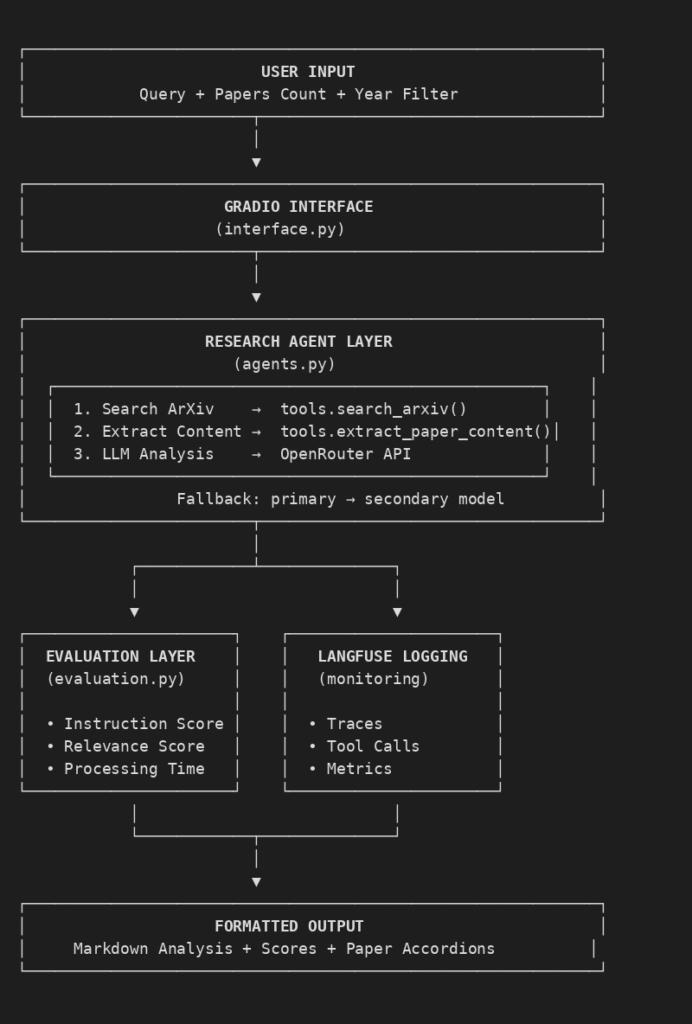
Abstractly accepts three inputs from the user: a research query in plain English, the number of papers to analyze (1-5), and an optional year filter. It then executes the following pipeline automatically.
- Searches ArXiv using a two-tier strategy – phrase search first, keyword fallback if needed.
- Extracts full paper content from ArXiv HTML, falling back to PDF if HTML is unavailable.
- Passes the content to a Large Language Model (LLM) agent that produces a structured analysis.
- Passes the analysis to a separate evaluator LLM that scores it on instruction following and content relevance.
- Returns the results to the user in an accordion-based Gradio interface.
Each paper analysis is structured into four sections – Problem, Method, Results, and Significance – with 50-75 words per section. The system validates every output against a set of quality checks and automatically retries with a fallback model if issues are detected.
Key Features
- Natural language queries against the full ArXiv corpus.
- Structured four-section analysis per paper.
- Automated quality evaluation with two independent scores.
- Dual-model fallback for both analysis and evaluation.
- Year filtering (single year or range).
- LaTeX-to-Unicode cleanup for readable scientific notation.
- Automatic retry on transient ArXiv API failures.
- All requests traced and logged via Langfuse for observability.
- MIT-licensed, deployable on HuggingFace Spaces or locally.
Architecture
The system follows a simple pipeline with no database and no state persistence. Each request is independent.
Technology Stack
The technology stack used in building Abstractly is given below.
| Component | Technology | Purpose |
|---|---|---|
| Agent Framework | smolagents 1.22.0 | Tool-based LLM orchestration. |
| LLM Access | LiteLLM 1.79.0 | Unified API interface. |
| UI Framework | Gradio 5.9.1 | Web interface. |
| Monitoring | Langfuse 3.8.1 | Observability and tracing. |
| PDF Processing | PyPDF2 3.0.1 | Text extraction from PDFs. |
Core Source Files
The following represent the source files that form the core of the Abstractly system.
abstractly/
├── src/
│   ├── agents.py       # LLM research agents and quality validation
│   ├── evaluation.py   # Instruction following and relevance scoring
│   ├── interface.py    # Gradio UI with accordion paper display
│   └── tools.py        # ArXiv search and content extraction
├── app.py              # Entry point
└── config.py           # Centralized configuration
Configuration
All settings are centralized in config.py, keeping the rest of the codebase free of hardcoded values.
# Application Version
APP_VERSION = "1.5.2"

# Model Configuration — all accessed via OpenRouter
MODELS = {
    "primary": "openrouter/openai/gpt-oss-120b",
    "fallback": "openrouter/deepseek/deepseek-chat-v3.1",
    "evaluator": "openrouter/qwen/qwen3-32b",
    "evaluator_fallback": "openrouter/openai/gpt-4o-mini"
}

# ArXiv Retry Configuration
ARXIV_RETRY_DELAY = 3      # Seconds to wait before retrying on empty results
ARXIV_MAX_RETRIES = 1      # Maximum retry attempts on empty ArXiv results

# Agent Configuration
MAX_AGENT_STEPS = 15       # Max tool calls per research session
PDF_PAGES_LIMIT = 15       # Pages to extract from PDFs
CONTENT_CHAR_LIMIT = 15000 # ~3000-4000 words for LLM context
The APP_VERSION constant is incremented whenever model configuration changes, enabling version-based filtering in the Langfuse monitoring dashboard. This is useful for comparing performance across model configurations.
Tools Layer: ArXiv Search and Content Extraction
The tools layer (tools.py) provides two functions that the agent calls during its analysis workflow. Both are registered as smolagents tools using the @tool decorator.
search_arxiv
The search function search_arxiv() uses a two-tier strategy to maximize result coverage. It first attempts an exact phrase search in paper titles and abstracts. If that returns fewer than half the requested papers, it falls back to a keyword AND search with stop words removed and punctuation cleaned.
@tool
def search_arxiv(query: str, max_results: int = 3, year_filter: str = "") -> dict:
    """Search arXiv for papers and return structured data."""
    ...
    # Retry loop: single retry after ARXIV_RETRY_DELAY seconds on empty results
    # Handles transient ArXiv API rate limiting without impacting normal queries
    papers = []
    for attempt in range(ARXIV_MAX_RETRIES + 1):

        # Try 1: Phrase search (high precision)
        search_terms = f'(ti:"{query}" OR abs:"{query}")' + date_filter
        papers = _execute_arxiv_search(search_terms, max_results)

        # If we got less than half of what we need, try keyword search (broader)
        if len(papers) < (max_results + 1) // 2:
            keywords = query.split()
            stop_words = {'or', 'and', 'the', 'a', 'an', 'of', 'in', 'to',
                          'for', 'with', 'is', 'as', 'at', 'by', 'on'}
            keywords = [
                kw.strip('.,;:!?*-_')
                for kw in keywords
                if kw.lower() not in stop_words and kw.strip('.,;:!?*-_')
            ]
            if len(keywords) > 1:
                title_terms = ' AND '.join([f'ti:{kw}' for kw in keywords])
                abs_terms = ' AND '.join([f'abs:{kw}' for kw in keywords])
                search_terms = f'(({title_terms}) OR ({abs_terms}))' + date_filter
            papers = _execute_arxiv_search(search_terms, max_results)

        # Results found - no retry needed
        if papers:
            break

        # Retry on empty results if attempts remain
        if attempt < ARXIV_MAX_RETRIES:
            print(f"   ⏳ ArXiv returned 0 papers, retrying in {ARXIV_RETRY_DELAY}s...")
            time.sleep(ARXIV_RETRY_DELAY)
The year filter supports both single years (e.g., "2024") and year ranges (e.g., "2022-2024"), and is validated dynamically against the current year to avoid impossible date ranges.
The retry mechanism deserves a specific mention. ArXiv’s API occasionally returns empty results for valid queries due to transient rate limiting, especially during sequential batch requests. To address that, a retry mechanism has been implemented that fires only on zero-result responses. It does not slow down normal successful queries and waits ARXIV_RETRY_DELAY (3 seconds) before re-running the full two-tier search sequence.
extract_paper_content
The content extraction mechanism (extract_paper_content()) prefers the HTML version of each paper, which is cleaner and faster. It falls back to PDF extraction if HTML is unavailable, extracting up to PDF_PAGES_LIMIT (15) pages.
@tool
def extract_paper_content(arxiv_id: str) -> str:
    """Extract text from arXiv paper HTML (preferred) or PDF (fallback)."""
    ...
    html_url = f"{ARXIV_HTML_BASE}{arxiv_id}"
    response = requests.get(html_url, timeout=15)

    if response.status_code == 200:
        text = re.sub(r'<[^>]+>', ' ', response.text)
        text = re.sub(r'\s+', ' ', text).strip()
        text = text[:CONTENT_CHAR_LIMIT]
        return clean_latex_artifacts(text)

    # Fall back to PDF
    pdf_url = f"{ARXIV_PDF_BASE}{arxiv_id}.pdf"
    response = requests.get(pdf_url, stream=True, timeout=30)
    pdf_reader = PyPDF2.PdfReader(BytesIO(response.content))
    pages_to_extract = min(PDF_PAGES_LIMIT, len(pdf_reader.pages))
    text = ""
    for page_num in range(pages_to_extract):
        text += pdf_reader.pages[page_num].extract_text() + "\n"
    text = text[:CONTENT_CHAR_LIMIT]
    return clean_latex_artifacts(text)
Both paths pass the extracted text through clean_latex_artifacts() in tools.py, which uses pylatexenc to convert LaTeX notation to Unicode, followed by regex cleanup for common patterns like $x^2$ → x², and ftfy to fix encoding issues. This handles approximately 85–90% of scientific notation in typical arXiv papers. Both of the tools wrap their execution in Langfuse spans, recording inputs and outputs for observability.
Agent Layer: Research and Quality Validation
The agent layer (agents.py) is the core of Abstractly. It orchestrates the full workflow: calling the ArXiv tools, running the LLM analysis, validating output quality, and deciding whether to use the primary or fallback result.
Creating the Agent
Each agent is a smolagents CodeAgent (a code agent) backed by a LiteLLMModel pointed at OpenRouter. Rather than selecting tools through structured JSON calls, the code agent writes and executes Python code to invoke them, giving it more flexibility in how it chains tool calls and processes results. The agent has access to exactly two tools: search_arxiv() and extract_paper_content().
def create_agent(model_choice="primary"):
    """Create research agent with OpenRouter."""
    model = LiteLLMModel(
        model_id=MODELS[model_choice],
        api_key=OPENROUTER_API_KEY,
        base_url=OPENROUTER_BASE_URL
    )
    return CodeAgent(
        model=model,
        tools=[search_arxiv, extract_paper_content],
        max_steps=MAX_AGENT_STEPS,
        name="research_agent",
        additional_authorized_imports=["json", "requests", "re"]
    )
The Analysis Prompt
The agent receives a prompt that provides the ArXiv search results directly (so the agent does not need to call search_arxiv() itself – that was already called separately to establish ground truth) and instructs it to extract the full content and write four-section analyses.
The prompt includes strict quality instructions that the agent must follow before returning its output. See below
CRITICAL QUALITY CHECKS - Before finalizing each paper's analysis, verify:
- Each section is 50-75 WORDS (count them!), not characters.
  Incomplete sections under 40 words are unacceptable.
- NO section ends mid-sentence or mid-word.
- Each section has DIFFERENT content - Results must NOT repeat Problem text,
  Significance must NOT repeat Method text.
- Each section is COMPLETE and self-contained, with proper sentence structure.
- You are writing SUMMARIES in your own words, not copying excerpts from the paper's text.
The expected output format is a dictionary with an Analysis key – shown below.
{
    "Analysis": {
        "Paper Title": {
            "Problem": "...",
            "Method": "...",
            "Results": "...",
            "Significance": "...",
            "metadata": {
                "id": "...",
                "published": "...",
                "url": "...",
                "authors": "..."
            }
        }
    }
}
Since the metadata fields must be copied verbatim from the provided ArXiv data – the agent is explicitly instructed not to paraphrase or shorten titles, IDs, or author strings.
Quality Validation
After the agent runs, validate_agent_output() checks the result before any fallback decision is made. It runs five categories of checks.
1. Duplicate Detection within Papers: Uses pairwise substring matching across all four sections. If any two sections share identical content – for example, if the Results section reproduces the text of the Problem section – the lower-priority one (the one that comes later in the ordering Problem → Method → Results → Significance) is flagged as duplicate. The same check applies to every pair of sections.
def _detect_duplicate_sections(paper_analysis, required_sections):
    """Detect duplicate content across sections using substring matching."""
    duplicate_sections = set()
    sections = {s: paper_analysis.get(s, '').strip() for s in required_sections
                if paper_analysis.get(s, '').strip()}

    for i, section1 in enumerate(required_sections):
        if section1 not in sections:
            continue
        for j, section2 in enumerate(required_sections):
            if j <= i or section2 not in sections:
                continue
            text1, text2 = sections[section1], sections[section2]
            if text1 in text2 or text2 in text1:
                duplicate_sections.add(section2 if i < j else section1)

    return duplicate_sections
2. Duplicate Detection across Papers: Checks every section of every paper against every section of every other paper. This catches the failure mode where the agent produces identical analysis for multiple papers.
3. Truncation Detection: Looks for repeated punctuation at the end of a section (e.g., ..., !!!) or text that ends with a lowercase letter, which indicates a mid-word cutoff.
def _is_section_truncated(text):
    """Detect if section text appears truncated."""
    text = text.strip()
    if re.search(r'([.!?])\1+$', text):
        return True
    if text[-1].isalpha() and text[-1].islower():
        return True
    return False
4. Word Count Validation: Sections under 35 words are flagged as too short.
5. Structure Validation: Checks for the presence of the Analysis key and non-empty paper entries. The validation returns a tuple of (valid_section_count, total_issues, issues_list) – where valid_section_count is the number of sections that passed all checks, total_issues is the count of problems found across all papers, and issues_list is the detailed list of individual failures. Any non-zero total_issues triggers the fallback.
Fallback Logic and Winner Selection
The research_papers() function manages the primary / fallback decision and winner selection.
# Execute primary agent
primary_result = agent.run(prompt)
valid_count, issue_count, issues = validate_agent_output(primary_result)

# Any quality issue triggers fallback
if issue_count > 0:
    print(f"🔄 Primary agent has {issue_count} quality issues, trying fallback...")
    fallback_result = create_agent("fallback").run(prompt)

# Choose best result based on valid section count
if primary_result and fallback_result:
    primary_valid, primary_issues, _ = validate_agent_output(primary_result)
    fallback_valid, fallback_issues, _ = validate_agent_output(fallback_result)

    if fallback_valid > primary_valid:
        result = fallback_result  # Fallback has more valid sections
    elif fallback_valid == primary_valid:
        result = fallback_result if fallback_issues < primary_issues else primary_result
    else:
        result = primary_result  # Primary is better
If both agents fail entirely, the function returns a user-friendly error message. If one fails and the other succeeds, the successful result is used regardless.
The models used for analysis are gpt-oss-120b (primary) and deepseek-chat-v3.1 (fallback). All results and metadata – which model was used, whether fallback was triggered, the app version – are logged to Langfuse at the trace level.
Evaluation Layer
Every analysis is scored on two independent dimensions by a separate evaluator LLM. The evaluator is completely separate from the agent used to analyze the paper. It uses qwen3-32b (primary) and gpt-4o-mini (fallback), accessed directly via the OpenRouter REST API rather than through smolagents.
Instruction Following Score
evaluate_instruction_following() in evaluation.py checks whether the agent correctly followed the structural requirements. It validates paper IDs against the ArXiv ground truth, runs the three-tier section scoring, and checks metadata completeness.
The three-tier scoring per section works as follows.
- 0.5 points – valid section (unique, not truncated, ≥ 35 words).
- 0.15 points – truncated OR short section.
- 0.1 points – truncated AND short section.
- 0 points – duplicate or missing section.
Metadata scoring adds up to 2.0 points per paper: 0.5 each for title, URL, publication date, and authors. Author matching uses partial credit – at least one matching author earns 0.25, all matching earns 0.5.
# 3-tier section scoring (max 2.0 per paper for sections)
for section in required_sections:
    section_text = paper_analysis.get(section, '').strip()
    if section in duplicate_sections:
        score += 0       # Duplicate
    elif not section_text:
        score += 0       # Missing
    else:
        is_trunc = is_section_truncated(section_text)
        word_count = len(section_text.split())
        if is_trunc and word_count < 40:
            score += 0.1   # Truncated AND short
        elif is_trunc:
            score += 0.15  # Truncated only
        elif word_count < 40:
            score += 0.15  # Short only
        else:
            score += 0.5   # Valid
The final score is normalized to 10 against the number of papers ArXiv actually returned – not the number the user requested. This ensures the agent is not penalized for ArXiv’s search limitations.
Content Relevance Score
evaluate_content_relevance() in evaluation.py sends the full analysis text to a separate evaluator LLM with a structured prompt. The evaluator assigns each paper to one of four tiers based on how well it matches the query, then scores it within that tier based on the content quality.
The tier system is given below.
- Tier 4 (8–10) – directly on-topic.
- Tier 3 (5–8) – partially relevant, strong.
- Tier 2 (2–5) – partially relevant, weak.
- Tier 1 (0–2) – off-topic.
The evaluator prompt includes 16 detailed examples spanning different research domains to anchor the scoring rubric. The evaluator returns a JSON object:
{
    "score": 8.7,
    "feedback": "Both papers directly address the query..."
}
If the primary evaluator fails, the fallback evaluator is attempted. If both fail, the score is reported as N/A (Not Available) and the papers are still displayed.
Interface Layer
The Gradio interface (interface.py) uses a custom dark theme and an accordion-based layout for paper display. Input controls are disabled during processing to prevent double submissions, and a loading overlay is shown while analysis runs.
The welcome screen sets user expectations upfront:
welcome_screen = gr.Markdown("""
## Welcome to Abstractly

Enter your research query on the left to get started.

⏱️ **Processing Time:** Depending on query complexity and ArXiv results,
analysis may take a few seconds to a few minutes
(typically 2-10 minutes for complex queries with multiple papers).

ℹ️ **Note:** This is a single-instance service. If other users are actively
running queries, your request will queue and processing time will be longer.
""")
The interface parses evaluation scores directly from the formatted result string returned by research_papers(), which embeds scores and metadata in a structured footer, shown below.
Evaluation Scores:
- Instruction Following: 9.5/10
- Content Relevance: 8.7/10
- Avg Time per Paper: 112.3s
- METADATA: user_requested=3, arxiv_returned=3, agent_returned=3
Paper count mismatches (e.g., ArXiv returned fewer papers than requested, or the agent analyzed fewer papers than ArXiv returned) surface as information banners above the results with appropriate guidance.
Observability with Langfuse
Every request is fully traced in Langfuse. The tracing is structured to correctly capture the complete execution graph: the top-level research_papers() span contains child spans for search_arxiv(), extract_paper_content() (one per paper), evaluate_content_relevance_primary() in evaluation.py, and optionally, evaluate_content_relevance_fallback() – also in evaluation.py.
langfuse.update_current_trace(
    tags=[
        f"agent_model:{agent_model_used}",
        f"fallback:{str(fallback_used).lower()}",
        f"version:{APP_VERSION}"
    ],
    metadata={
        "agent_model": agent_model_used,
        "fallback_used": fallback_used,
        "app_version": APP_VERSION
    }
)
This makes it straightforward to filter the Langfuse dashboard by model, fallback status, or app version – for example, comparing the performance of v1.5.1 vs v1.5.2 after a model configuration change, or tracking what fraction of requests triggered the fallback.
Note that Langfuse’s free tier supports up to 50,000 observations per month, which is ample for a project at this scale.
Cost Model
Abstractly is economical – but not free. All of the LLM access goes through OpenRouter’s pay-as-you-go pricing. The ArXiv API is free with no authentication required, and Langfuse monitoring is free up to 50,000 observations per month.
Approximate cost per query (3 papers, assuming 25% fallback rate):
| Scenario | Cost |
|---|---|
| Best case (primary models only) | ~$0.001 (~₹0.09) |
| Typical (25% fallback) | ~$0.001 (~₹0.09) |
| Worst case (all fallback) | ~$0.003 (~₹0.28) |
Approximate monthly costs at scale (25% fallback assumption):
| Volume | Papers | Cost |
|---|---|---|
| 100 queries | 300 | $0.14 (~₹13) |
| 300 queries | 900 | $0.43 (~₹41) |
| 500 queries | 1,500 | $0.72 (~₹68) |
Model pricing (input/output per million tokens):
gpt-oss-120b(analysis primary): $0.039 / $0.19 (~₹3.7 / ~₹17.9)deepseek-chat-v3.1(analysis fallback): $0.15 / $0.75 (~₹14.1 / ~₹70.5)qwen3-32b(evaluator primary): $0.08 / $0.24 (~₹7.5 / ~₹22.6)gpt-4o-mini(evaluator fallback): $0.15 / $0.60 (~₹14.1 / ~₹56.4)
For context, a ChatGPT Plus subscription costs $20/month (₹1,999) – roughly the same as 14,000+ Abstractly queries.
To get started – create a free account at openrouter.ai, add $5 in credits (enough for thousands of queries), and set the OPENROUTER_API_KEY environment variable with you Openrouter API key. The OpenRouter dashboard shows real-time token usage and costs per request.
Benchmark Results
We evaluated Abstractly on 50 queries spanning all 9 ArXiv domains at varying complexity levels. The distribution was weighted to approximate actual ArXiv submission volumes: Computer Science and Physics each received 12 queries (~24%), Mathematics received 6, and the remaining domains received 3–4 each.
Each of the queries analyzed 2 papers. Scores were computed independently for each query and averaged.
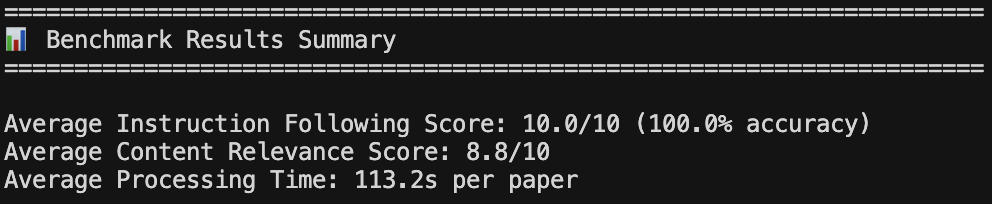
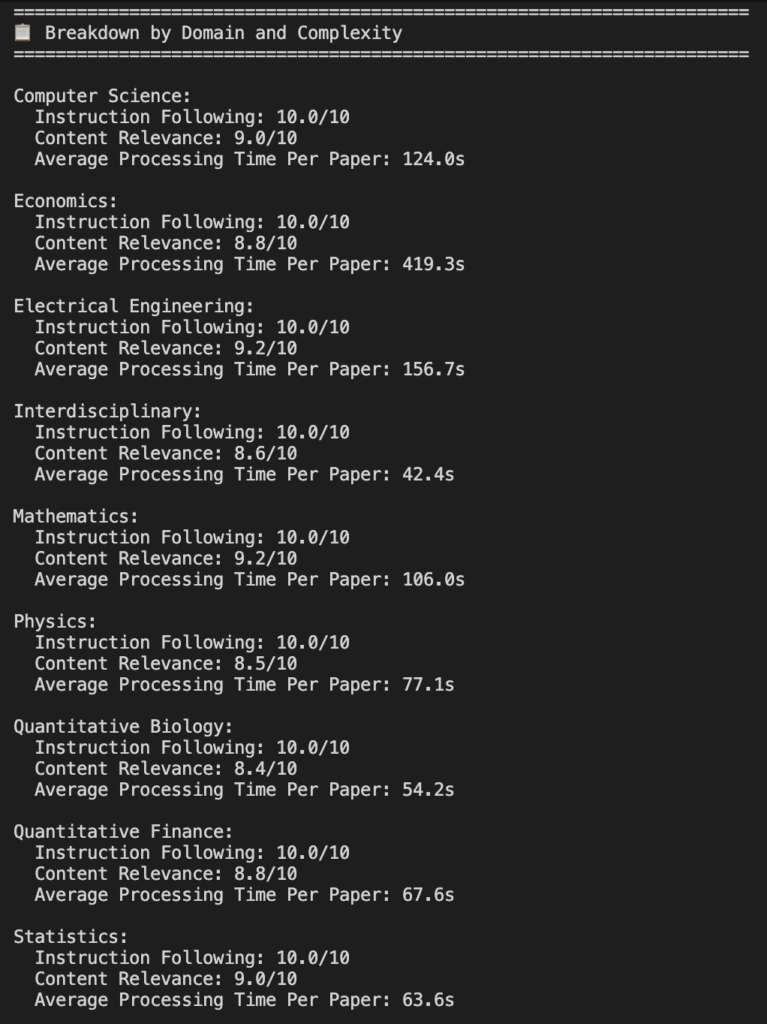
The 100% instruction following score reflects that the quality validation and fallback system is working as intended – any output that fails the checks triggers a retry, so the final result presented to the evaluator always meets the structural requirements. The 8.8/10 content relevance score reflects solid but not perfect alignment to the query in terms of the generated content. Some queries lying at the margins of domain boundaries tend to return papers that are adjacent but not precisely on-topic, which is expected behavior from a keyword-based search system.
The Economics domain shows a significantly higher processing time (419.3s). This is attributed to the fact that those queries triggered the fallback agent more frequently, running both the primary and fallback sequentially before selecting the better result.
Note: The aforementioned scores reflect performance with the specific model configuration at the time of evaluation (gpt-oss-120b, deepseek-chat-v3.1, qwen3-32b, and gpt-4o-mini). Changing any of the four models will affect all of the three metrics. Additionally, given the non-deterministic nature of language models, re-running the same benchmark with identical models may produce slightly different scores.
Deployment
Abstractly is deployed on HuggingFace Spaces (free tier, CPU basic, 2 vCPUs, 16GB RAM). It can also be run locally with a standard Python environment.
Local Setup
Abstractly can be run locally with a standard Python environment. Clone the repository, install dependencies, and configure your environment variables as shown below.
bash:
git clone https://github.com/ankanghosh/abstractly.git
cd abstractly
pip install -r requirements.txt
cp .env.example .env
# Add your API keys to .env
python app.py
Access at: http://localhost:7860
Environment Variables
The environment variables required are as follows. A .env.example file is included in the repository as a reference template.
OPENROUTER_API_KEY=sk-or-v1-xxxxx
LANGFUSE_SECRET_KEY=sk-lf-xxxxx
LANGFUSE_PUBLIC_KEY=pk-lf-xxxxx
LANGFUSE_HOST=https://cloud.langfuse.com
Hugging Face Spaces
Abstractly is deployed on HuggingFace Spaces and can be set up on your own Space in a few steps. Create a new Space with the Gradio SDK, push the repository code, and add the environment variables as Repository Secrets in Space Settings. The Space auto-deploys in approximately 2 minutes after pushing code. See DEPLOYMENT.md in the repository for detailed instructions.
Future Directions
Several enhancements are planned for future development. Some of them are given below.
- Additional Research Platforms: Abstractly currently searches ArXiv exclusively. Integrating OpenAlex, Semantic Scholar, and PubMed would expand coverage significantly, particularly for biology, medicine, and social sciences.
- Advanced Filtering: Citation count filtering via Semantic Scholar or OpenAlex, enabling users to surface high-impact papers specifically.
- Collaboration Features: Sharing analysis results via URL and export to multiple formats (PDF, DOCX, JSON, Markdown).
- Domain-specific Modes: Optimized retrieval and prompt configurations for specific domains — for example, routing medicine queries to PubMed instead of ArXiv, using ArXiv category filters to narrow physics searches, and tuning analysis prompts to the conventions of each field.
Conclusion
Abstractly demonstrates that the friction of arXiv research – searching, reading, and synthesizing across multiple papers – can be meaningfully reduced with open-source tooling and economical pay-as-you-go LLM access. Whether one is a researcher staying abreast with a fast-moving field (e.g., AI in Computer Science or any other dynamic research area), a practitioner evaluating methods across an arXiv domain, or simply curious about what the latest science says on a topic, Abstractly provides structured, sourced analysis in minutes rather than hours.
Under the hood, the system combines smolagents for code agent orchestration, LiteLLM for unified model access, a quality validation loop that catches and retries poor outputs, and independent fallback models for both analysis and evaluation – all of which work together to ensure what reaches the reader is structured, complete, and relevant.
Abstractly is an open-source project and the full source code is available on GitHub under the MIT license. The deployed application is live on Hugging Face Spaces.
Abstractly is an open-source project and the full source code is available on GitHub under the MIT license. The deployed application is live on Hugging Face Spaces.
Thank you for reading through! We genuinely hope you found the content useful. Feel free to reach out to us at ankanatwork@gmail.com with feedback, suggestions, or questions.
Acronyms used in the blog that have not been defined earlier: (a) Machine Learning (ML), (b) Artificial Intelligence (AI), (c) MIT (Massachusetts Institute of Technology), (d) HTML (HyperText Markup Language), (e) PDF (Portable Document Format), (f) Application Programming Interface (API), (g) User Interface (UI), (h) Identity (ID), (i) REpresentational State Transfer (REST), (j) Uniform Resource Locator (URL), (k) JavaScript Object Notation (JSON), (l) second (s), (m) Central Processing Unit (CPU), (n) virtual CPU (vCPU), (o) Random Access Memory (RAM), (p) Software Development Kit (SDK), and (q) Office Open XML Document (DOCX).